

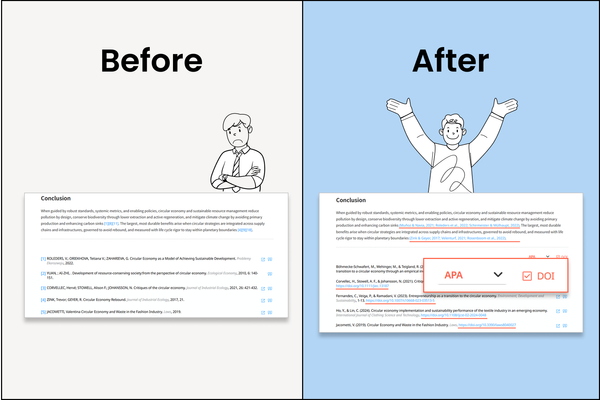
tlooto now supports journal-specific reference formatting.
When writing a paper, you must follow the required formatting rules for References and in-text citations. With tlooto, you can now adjust them with just a single click.
Feature Overview
▪️Reference Style Selection
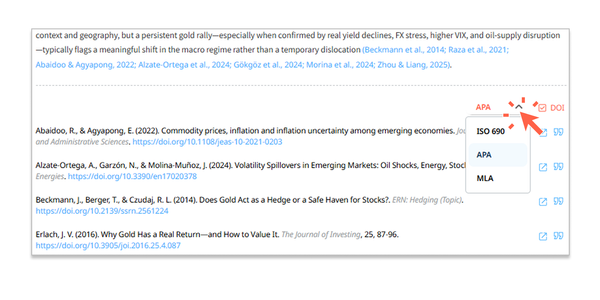
Choose between ISO 690, APA, or MLA directly from the dropdown menu, and all references will instantly be reformatted. The in-text citation style at the top of the report will also be updated accordingly.
▪️ Citation Formatting Inside Reports
Not only the reference list but also citations inside the report answers will automatically follow the selected style, ensuring compliance with journal requirements.
▪️ DOI On/Off
Show or hide DOI links with one click. Include them for stronger referencing or remove them when unnecessary for manuscript submission.
Use Cases
▪️ Journal Submission
Format references and citations according to the exact style your target journal requires.
▪️ Academic Writing
Apply consistent citation formatting across essays, theses, and research drafts.
▪️ Collaborative Research
Share results with colleagues so everyone sees the same reference style.
How to Use
1. Scroll down to the Reference section in your tlooto results.
2. Click the style dropdown in the top-right corner and select your preferred citation style (ISO 690, APA, MLA).
3. Turn DOI On/Off depending on your needs.
4. Copy the entire report with your chosen citation style and use it directly.
 Researchers no longer need to waste time fixing citation formats manually. With one click, tlooto automatically applies the correct format according to journal requirements.
Read the Previous Article
-> PDF Analysis
#tlooto #AcademicWriting #ResearchTools #CitationManagement #APAstyle #MLAstyle #ISO690 #ReferenceFormatting #DOI #AcademicResearch