

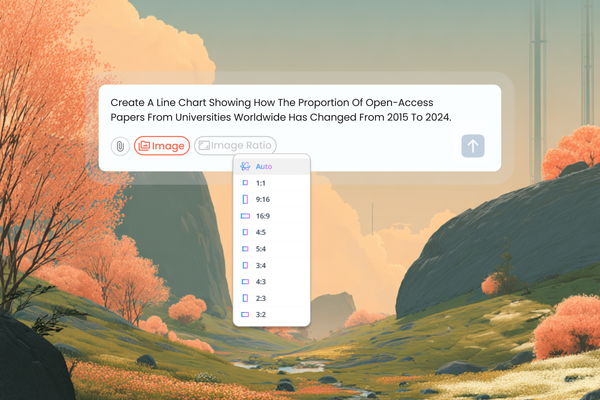
Academic research often begins with ideas that are hard to express in words — complex data, abstract concepts, or evolving hypotheses. Now, with tlooto AI’s Image Creation feature, you can instantly turn those ideas into visuals. tlooto AI helps researchers create publication-ready figures, conceptual diagrams, and data visualizations simply by describing them in natural language. From tables to charts to explanatory images, everything can now be generated directly inside your research workspace. Whether you’re preparing a paper, building a presentation, or collaborating with your team, tlooto AI helps you visualize your academic ideas faster, clearer, and smarter.
Feature Overview
▪️ Image Creation
Describe your data or concept in simple words and tlooto AI instantly generates visuals suitable for papers, presentations, or reports.
Example:
Prompt → “Visualize the correlation between temperature and plant growth over time.”
tlooto AI generates a clear, labeled line chart ready for inclusion in your paper. [See the answer]
▪️ Table-to-Image Conversion
Transform your research tables into clear, shareable visuals that highlight key results at a glance, which is perfect for conference slides or visual abstracts.
Example:
Upload a table of experimental results and tlooto converts it into a concise comparison chart emphasizing key findings. [See the answer]
▪️ Flexible Image Sizes
Choose the best aspect ratio and layout for your needs, whether it is a figure for a journal article, a poster, or a slide deck.
Example:
Select 16:9 for a presentation, 1:1 for a figure, or 9:16 for a social media post. [See the answer]
Use Cases
▪️ Academic Presentations
Turn long tables and dense text into clear, professional visuals for seminars or conferences.
▪️ Research Papers
Visualize theories, workflows, or relationships between variables for easier explanation and engagement.
▪️ Collaborative Projects
Share image links directly with collaborators — everyone can view and ask follow-up questions directly.
How to Use
1. Go to tlooto.com
2. Enter a description or upload a table.
3. Click Image button to instantly visualize your idea.
4. Adjust aspect ratio or regenerate for different styles.
With tlooto AI’s Image creation, researchers can now bridge the gap between text and understanding — transforming complex academic ideas into clear, visual insights with just one prompt. Whether it’s simplifying dense tables, illustrating abstract concepts, or preparing engaging visuals for presentations and publications, tlooto makes it faster and easier to communicate your research.
Read the Previous Article
-> Automatically format references & citations
#tlooto #tlootoAI #AcademicVisualization #AIforResearchers #DataVisualization #ResearchTools #AcademicAI #ScientificFigures #AIImageGeneration #ResearchCommunication #TableToImage #VisualResearch #AcademicPresentation #ResearchWorkflow #CollaborativeResearch #AIResearchAssistant #ImageCreateAI